Using Open Suite
Open Suite is a browser workspace for email, documents, files, calendars, meetings, and team tools. These guides are written for people using Open Suite day to day.
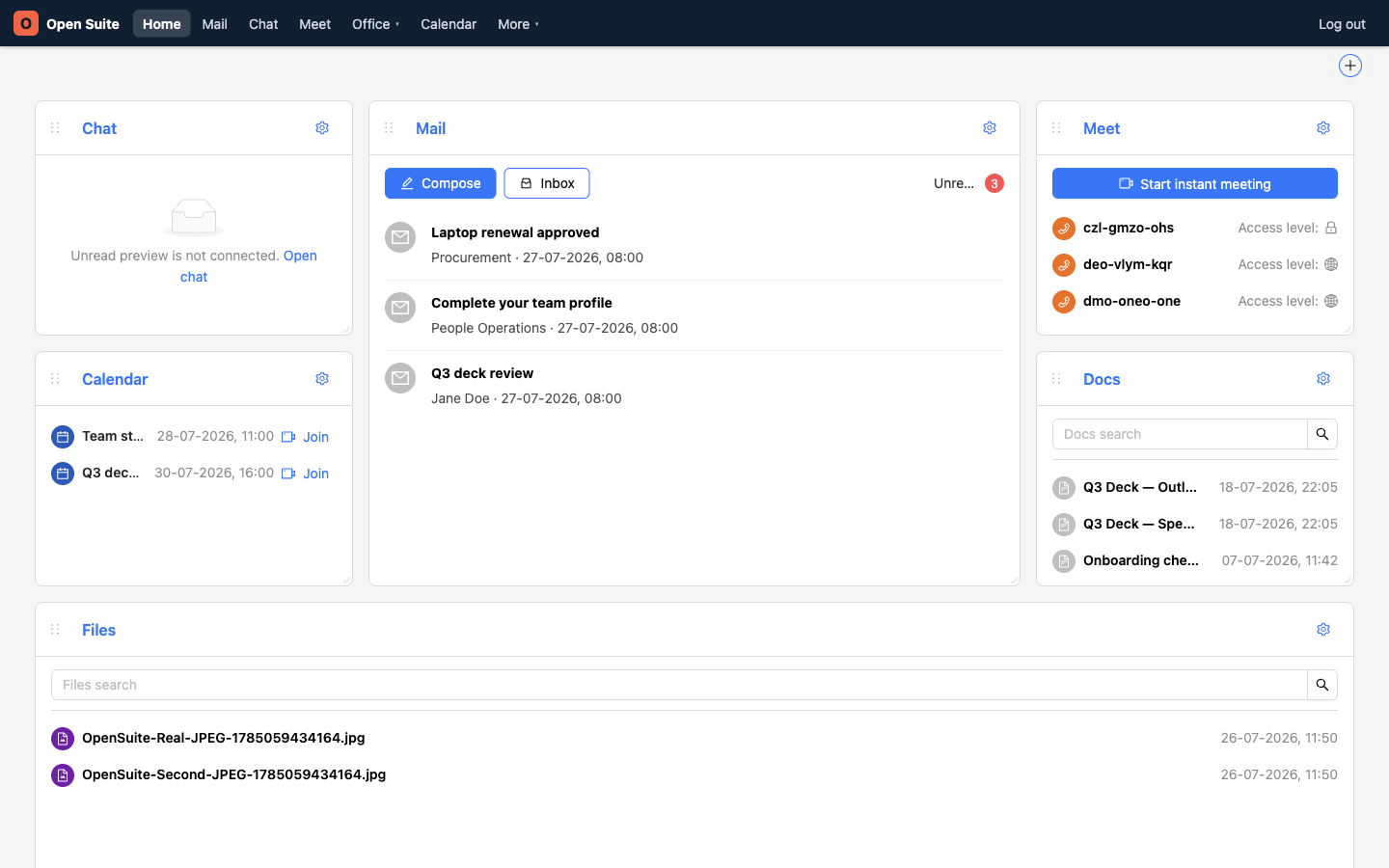
Start from the portal. After sign-in, the home page shows team chat, mail, meeting rooms, upcoming calendar events, recent Wiki pages, and file shortcuts.
Swipe or scroll the screenshot to see every detail.
1
Mail previews unread messages and opens your inbox.
2
Calendar shows upcoming events and their join links.
3
Meet starts an instant call or reopens a room.
4
Files keeps recent work close to the dashboard.
What you can do
- Find your way around Open Suite
- Send and manage email
- Work with files
- Share files and folders
- Create a document
- Collaborate on documents
- Create a calendar invite
- Join a video call
- Use contacts
- Work with tables
- Search and find work
- Use team chat
- Manage your account
- Fix common problems
Daily starting point
Use the dashboard first when you are not sure where to go:
- Check Calendar for upcoming meetings and click Join when a meeting is ready.
- Use Meet → Start instant meeting for an unscheduled call.
- Use Docs to reopen recent Wiki pages, or Files to reopen Office documents and uploaded files.
- Use the top navigation to open Mail, Chat, Meet, Office apps, Calendar, or the tools under More.